Instagram is a massive platform for developing every beauty master's personal brand. Targeted advertising on Instagram will significantly expand your audience and bring in new clients. In this blog, you will find a step-by-step guide and useful tips for beauty professionals on setting up ads in Instagram and Facebook.
It’s no secret that Instagram is one of the most popular social networks. According to AIN data, in 2021, the active Instagram user audience in Ukraine reached about 14 million users. It goes without saying that the majority of these users are women.
Just imagine, over 7 million girls daily scroll through their news feeds and watch stories. Instagram advertising is an excellent tool to tell your target audience about your own brand, spark their interest, and invite them for services.
Today's blog is fully dedicated to Instagram advertising: we will discuss the available tools, explain how a beauty professional can expand their audience through targeting, and provide detailed step-by-step instructions relevant for 2021.

Types of Instagram Advertising
Instagram is a huge platform for personal brand growth. By correctly using all available advertising tools, you can significantly increase the number of "live" followers, fill your booking calendar, and take your income to a new level. First, let's look at the available promotion methods for a beauty master:
- Targeted advertising for your specific target audience;
- Influencer marketing (ads from opinion leaders);
- Advertising in niche communities.
As Beauty Hunter's practice shows, the most effective and cost-efficient method is specifically targeted advertising.
Advantages of Targeted Advertising on Instagram
Why is targeting the best option for advertising? It’s simple – it allows you to show ads to the most effective audience that will actually be interested in your services. Most importantly, you can increase the reach of your posts to a broad audience and introduce a large number of users to your account.
Influencer advertising can be very effective on one hand, but risky on the other. You must be sure that the blogger's audience is interested in your service and that they have real followers rather than bots for the sake of numbers. Be sure to consider regional proximity, as the beauty industry is closely tied to location (it’s crucial for clients to be able to reach you easily rather than traveling to the other side of the city). Additionally, bloggers often overload their pages with ads, and you might simply get lost among other recommendations and sponsored posts.
Niche page advertising is a great tool for finding models for procedures but is less suitable for attracting regular clients. Of course, you can hope that a model likes your service and stays with you as a client. However, it's worth evaluating the return on investment for free procedures or procedures at the cost of consumables. The goal of advertising is to generate income.

Compared to other options, targeted advertising is the best choice. It allows you to precisely set the audience by:
- Location;
- Gender;
- Age;
- Interests.
Nobody knows your audience better than you do, so by operating with the interests and age of your clients, as well as considering your location, you can quickly set up ads via the mobile app and get great results.
How to Prepare Your Instagram Account for Running Ads?
There are two available ways to set up ads on Instagram:
- Setting up ads directly through the Instagram app on your phone;
- Setting up Instagram ad campaigns via Facebook Ads Manager on a computer.
Each option has its advantages. For example, through the mobile app, ads can be set up quickly and easily, making it convenient to track statistics and results. Working with the Facebook ad account requires more attention and involvement but opens up a vast range of opportunities for promotion, campaign creation, goal setting, analytics, and working with audiences (custom or lookalike)!
To launch targeted ads via Facebook, you need to create a Facebook Business Page (you can link your Instagram profile to it). If you want to run ads through the Instagram app, you need to switch your profile to a Professional Account. This will give you access to follower statistics and post performance, the ability to promote posts and stories, and the option to add more business data.
Connecting a Business Profile on Instagram
To connect a business profile in the Instagram app:
- Go to "Settings" → "Account" → "Switch to Professional Account."
- Choose a category that matches your line of work.
- Link your Instagram business account to your Facebook Business Page.
First method – via the app on your page → "Edit Profile" → "Public Business Information" → "Page." Then select an existing page or create a new one.
Second method – via Facebook. Go to your Business Page → "Settings" → "Instagram" → "Connect Account."
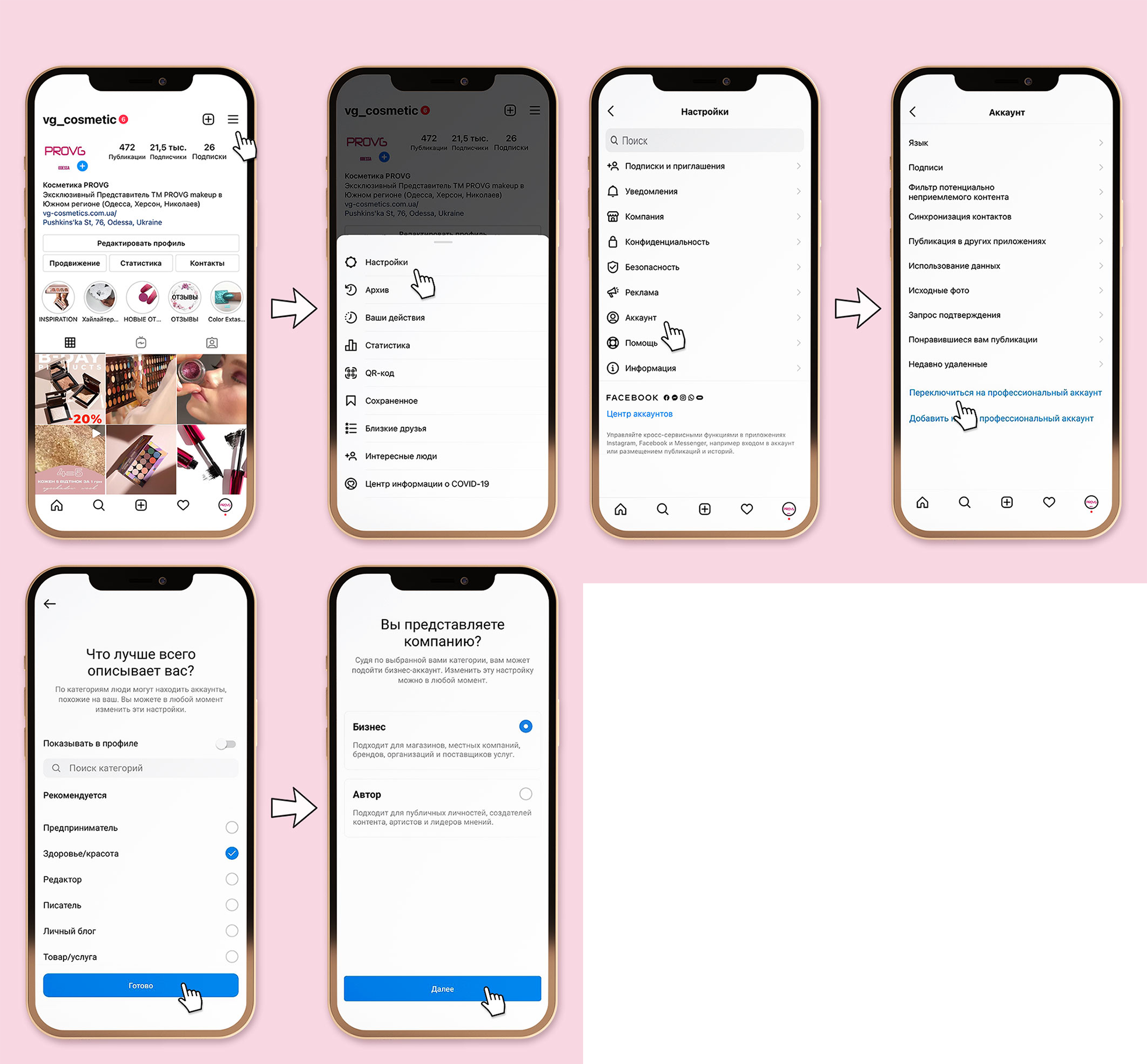
Instagram and Facebook are a convenient platform with interconnected tools. Now you can make changes to your Instagram profile, reply to messages and comments through the Facebook interface.
How to Properly Design Your Instagram Profile?
Your Instagram profile is your face; its design and appearance create the first impression on a client. A correctly filled out and designed Instagram profile can motivate a user to follow you and book a service. The description should be informative and clear.
Examples of proper profile design
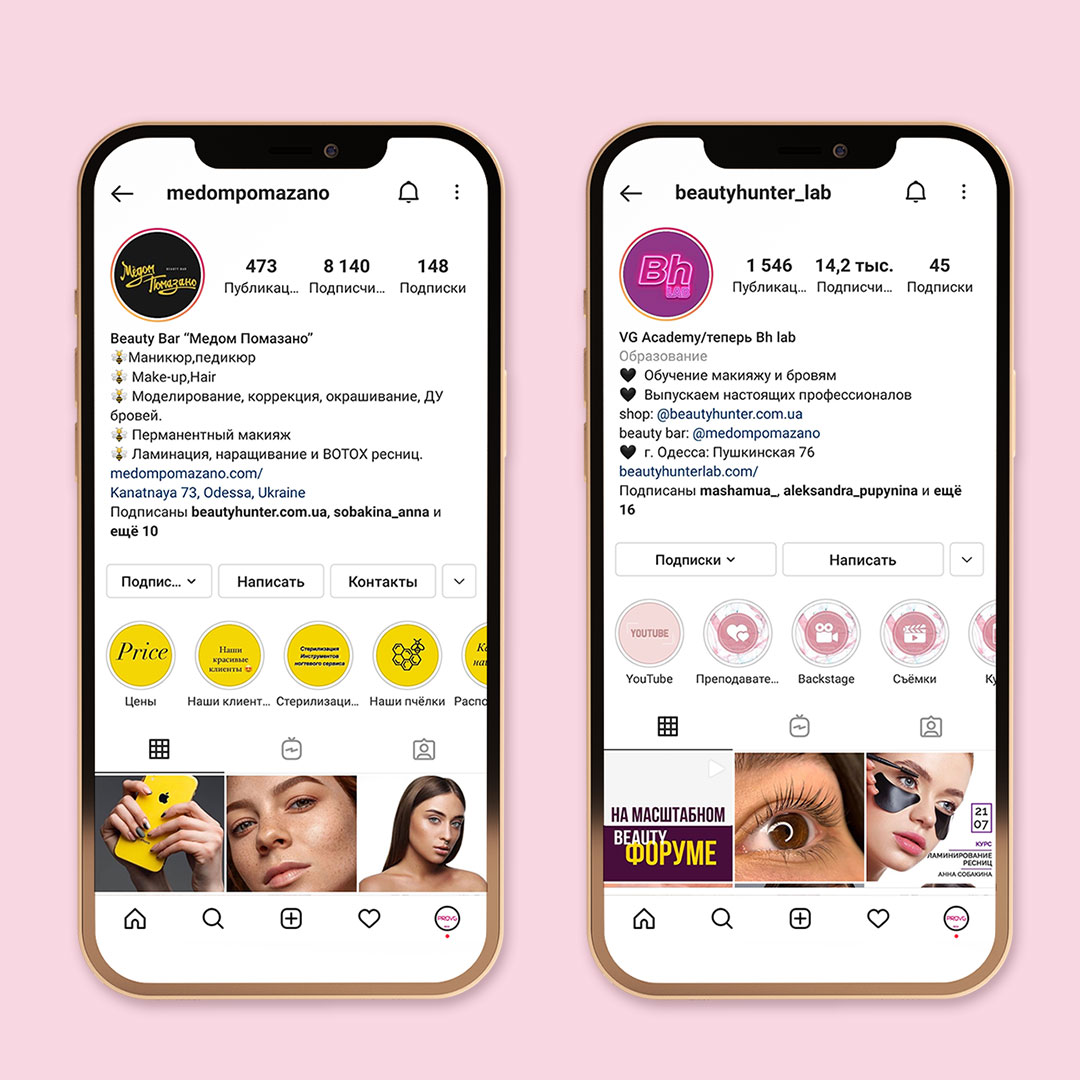
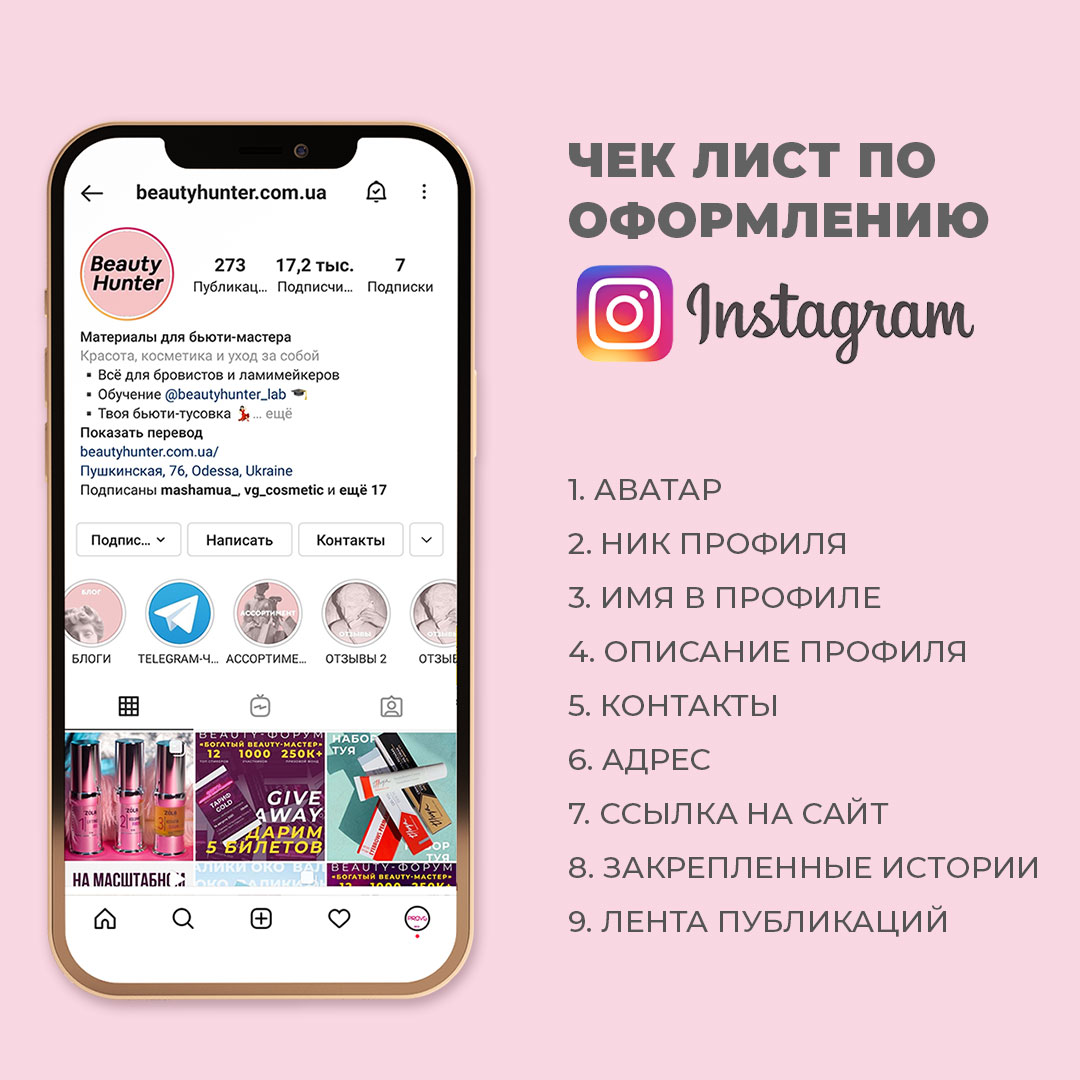
Instagram Profile Design Rules:
- Avatar – should be your photo, brand logo, or a product photo (depending on your activity).
- Username (Handle) – clear and easy to remember.
- Profile Name – should contain key information. Recommended size: no more than 30 characters.
- Bio – structured and easy to read. It can contain your Unique Selling Proposition (USP), current promotions, a list of key services, or serve as a method of self-expression. Recommended size: no more than 150 characters.
- Highlights – a great way to structure content by category, convey important information to the client, and organize easy navigation.
- Feed – a must-have! Design it according to your taste, talk about your work, and post photos of your results or accent product shots.
- Contact Information – Instagram provides a convenient button for contact. Fill in your phone number and email so it's always easy for the client to reach you.
- Address – in our opinion, this is mandatory. Your location is the final factor by which a client decides whether to visit you or not.
- Website Link – if you have one, specify it in the special field. Many beauty masters use multi-links (linktrees) to expand profile capabilities.
A great idea is to include an online booking link in this field.
We recommend that all masters use special booking and accounting software. They allow your clients to book online, and let you conveniently manage your schedule without constant calls and notebooks. By the way, all members of the Beauty Hunter Discount Club loyalty system receive special conditions from Y-clients. Read more in the blog "All about the Beauty Hunter Discount Club loyalty system."
If you consistently follow all these steps, your page will be fully ready for launching targeted ads.
How to Set Up Targeted Instagram Ads from Your Phone?
Setting up ads within the app itself is easy. You can only promote already created posts and stories. Although the functionality inside Instagram is limited compared to the Facebook ad account, it is quite enough to increase reach.
Promoting Posts on Instagram
As a reminder, you can only promote already created posts within the app. Based on post statistics, you can conclude which post your followers liked most and launch its promotion.
- Open the post and tap "Promote"
- Select a promotion goal.
There are 3 main goals:
More profile visits – if you want to increase your follower count.
More website visits – if you want to promote your site and get leads. Or lead users directly to online booking.
More messages – to engage the audience in Direct messaging.
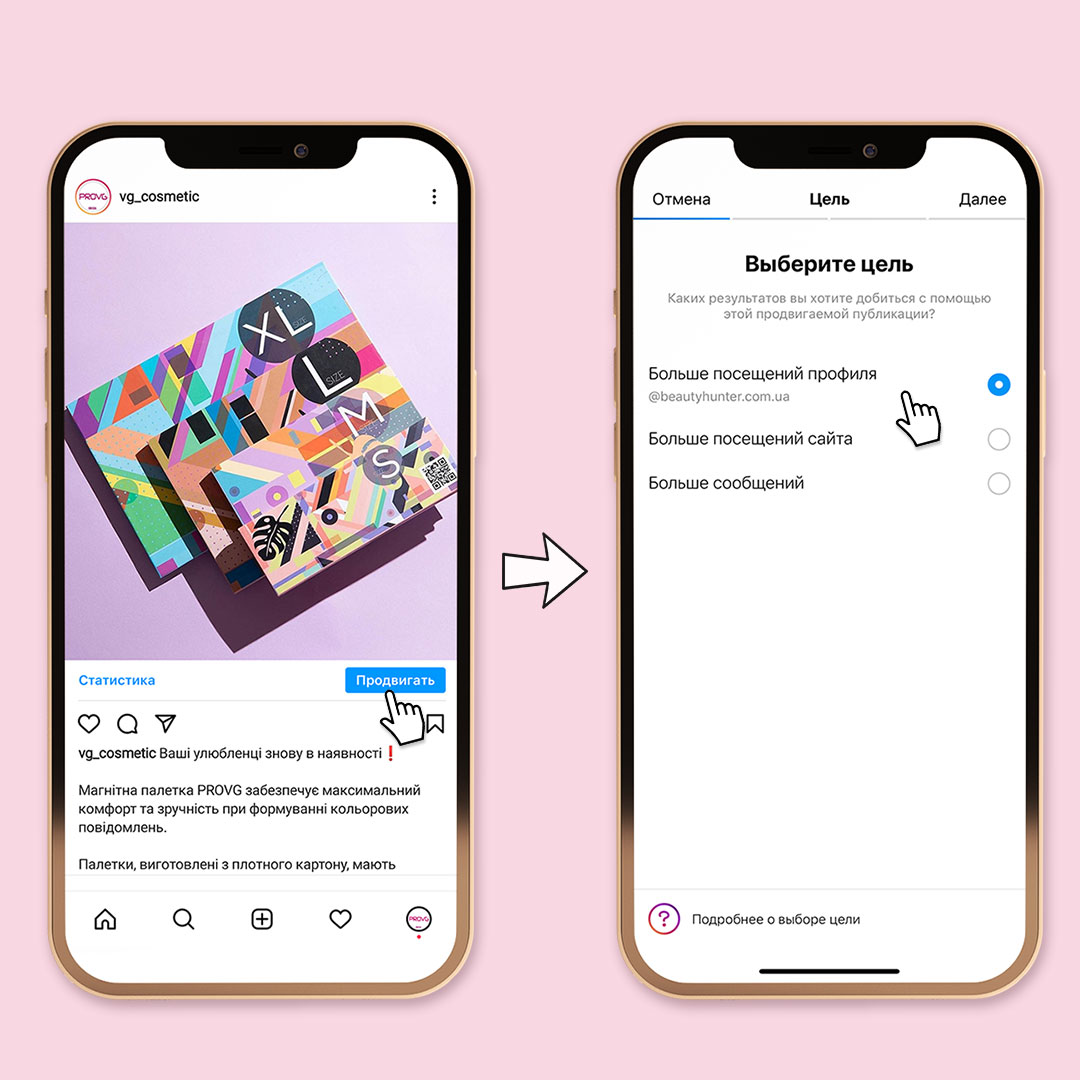
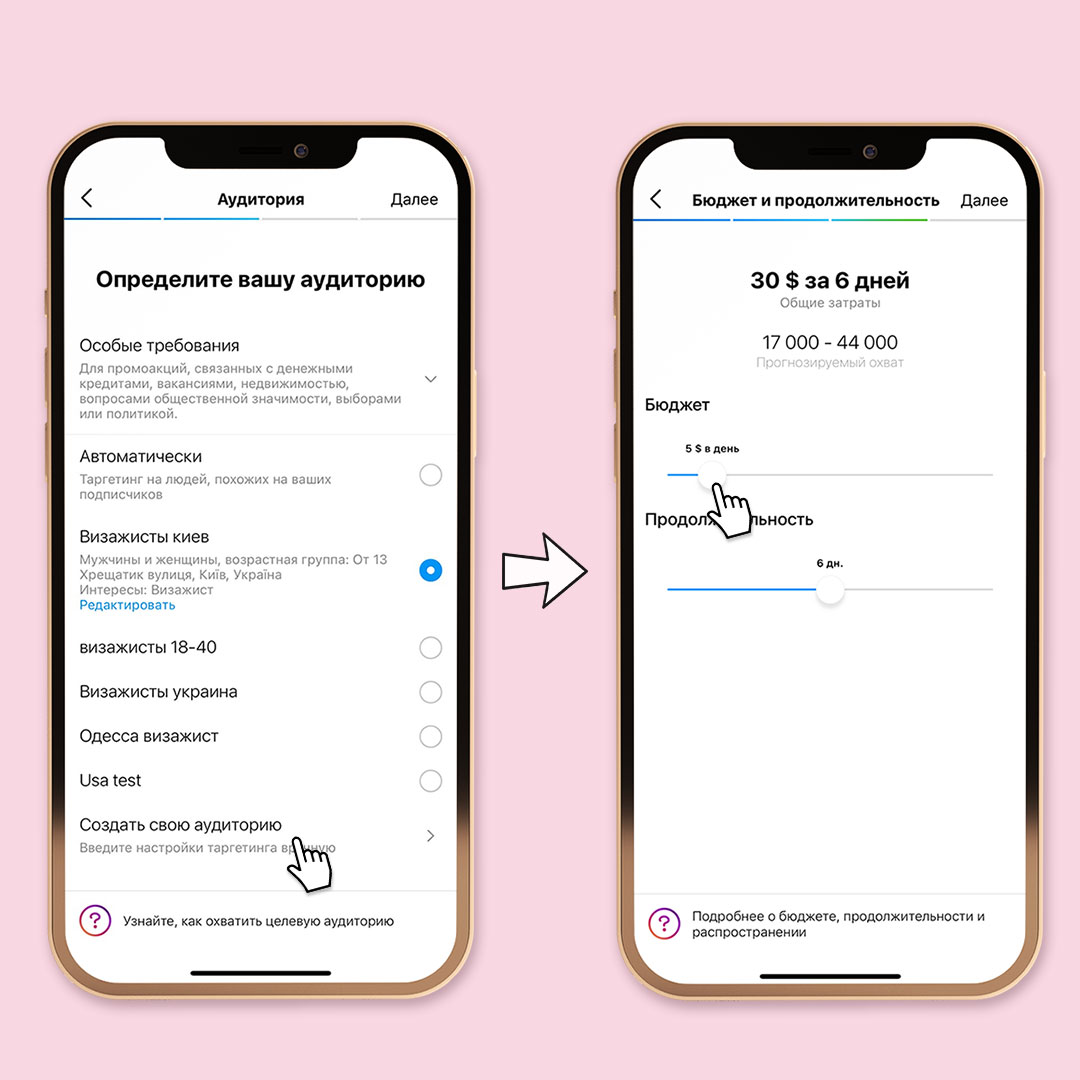
- Select your target audience. You can create your own audience or use an automatic one.
Automatic – targeting people similar to your followers. We recommend using this only if you are sure your followers perfectly match your target audience and you have no bots. In other cases, it’s better to create your own audience. - Select "Create Your Own Audience."
- Fill in the audience name.
In the future, you can select this same group of users for other ad campaigns. - Select location for targeting.
Here you can use regional settings (enter city, region name) or local-level ads (choose a radius from 1 to 30 km from your current location or a specific address). - Fill in user interests.
This is a great tool if you know your target audience's preferences (you can use interests like beauty, eyebrows, makeup artist, beauty salons, etc., but don't put all interests together; I advise testing them separately to see which works best). - Select gender and age of the target audience.
Depending on your settings, the potential reach will change. Make sure the audience isn't too narrow or too broad. - Set budget and ad duration.
Calculate the budget based on your capabilities and try to stick to a middle ground, but no less than $5 per day. We don't recommend a duration of less than 6-7 days; otherwise, you won't be able to adequately assess the ad's effectiveness. Usually, within 2 days, you can roughly understand the audience's reaction. The system will finally update potential reach based on your budget.
Remember that Facebook and Instagram optimize results, and if you see that the ad is working well in the first two days, don't touch it – most likely, after 5-7 days, the results will be even better. - Check all selected settings. Carefully review all settings and use the promotion preview.
- Click "Create Promotion." Your ad will go for moderation; this takes some time as the algorithm checks if your ad complies with social network rules.
Install the "Facebook Ads Manager" app on your phone to track results.
Always calculate the results of your ad campaigns and ask clients how they found you and what caught their attention.
Promoting Stories on Instagram
Story promotion is launched just like post promotion:
- Select the desired story.
- Select the goal (where you want to lead users).
- Set targeting settings.
- Set budget and duration.
Note that you cannot promote stories that contain interactive elements (like polls). If a story was published in the last 24 hours, just open it and click "Promote."
You can monitor ad effectiveness in the "Promotions" section. Information on the promotion period, budget spend, audience settings, and click count will be available here.
The internal Instagram app functionality is quite enough for a beauty master to start their promotion, try things out, and experiment with audience and budget settings. If you want to use deep settings, build a user interaction strategy, and clearly analyze campaign effectiveness, the Facebook Ads Manager account will be useful.
How to Set Up Instagram Ads via Facebook Ads Manager?
Facebook Ads Manager or Business Manager is a powerful promotion tool used by almost all companies.
It allows you to:
- Run multiple ads for different audiences within one campaign (or test audience reaction to different creatives).
- Use deep audience settings by interests and location.
- Analyze ad effectiveness.

What is the Ad Center and Facebook Ad Account?
Facebook offers two ways to create ads on the platform:
- Using the Ad Center – a more simplified way.
- Using Facebook Ads Manager – advanced functionality.
Working with the Ad Center is somewhat similar to launching ads from the app but with its own peculiarities. You won't be able to limit post promotion to Facebook or Messenger alone; the ad will be shown across Instagram, Facebook, and Messenger.
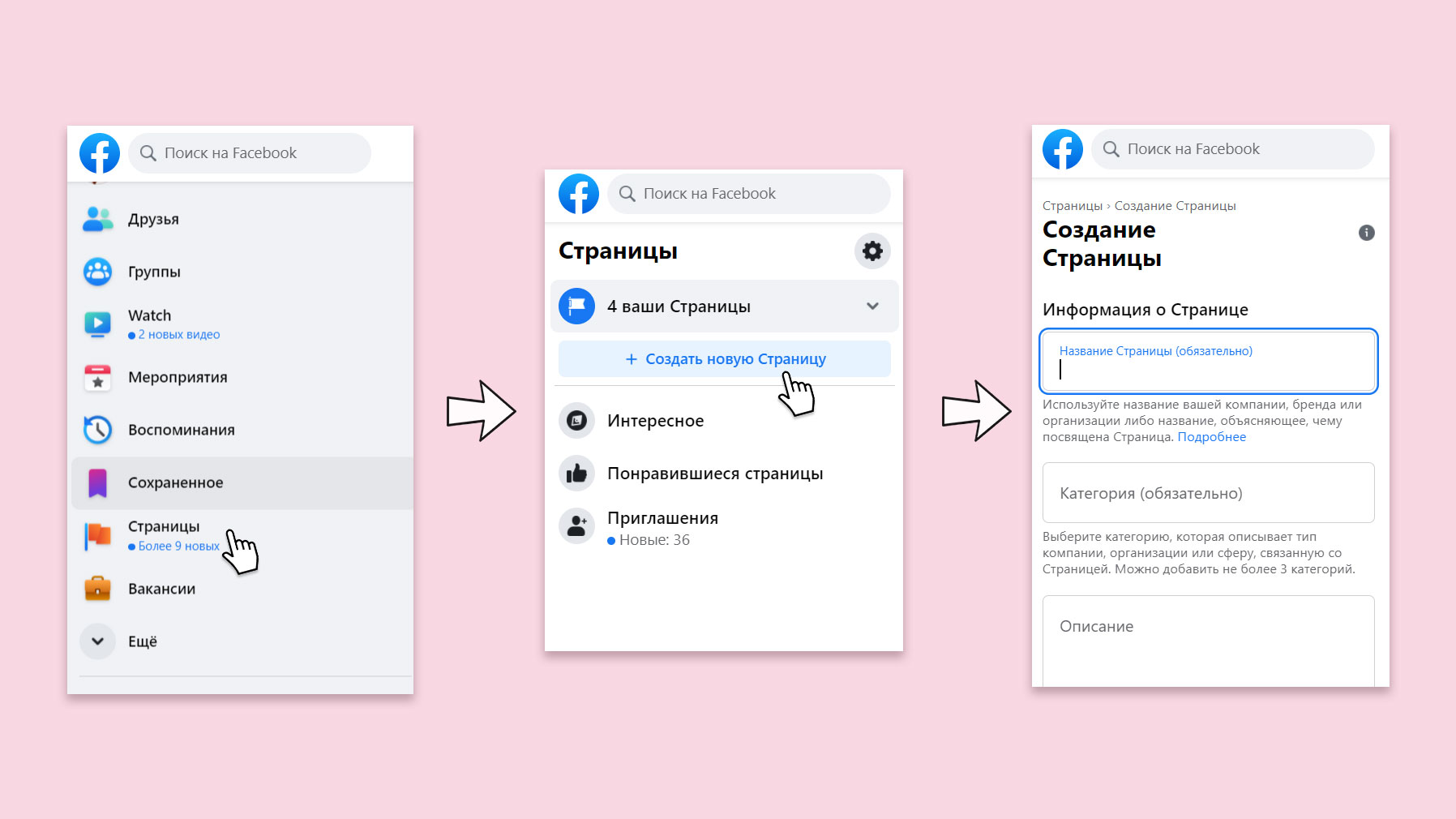
We already mentioned that you will need a Facebook Business Page. Creating it is easy: on the main Facebook page → "Pages" → "Create New Page." Then fill in all necessary information (Facebook provides clear instructions at every step). After that, you will have access to the Ad Center and ad account.
To launch an Instagram ad via the Ad Center, click → "Promote" → "Promote Instagram Post" and select the desired post. Then set up targeting and choose a payment method.
Creating Ads, Posts, and Stories via Facebook Ads Manager
The Facebook ad account opens wide possibilities for setting up ads by goals, audience, and creatives.
How to create an ad campaign via Ads Manager:
- Access Ads Manager via the main Facebook page.
- Click the "Create" button.
- Choose an ad campaign goal.
There are three main directions: Awareness, Consideration, and Conversion. The most useful goals for beauty masters are "Reach," "Traffic," "Engagement," and "Messages." The choice of goal will determine the strategy Facebook follows in distributing the budget and selecting users for ad delivery.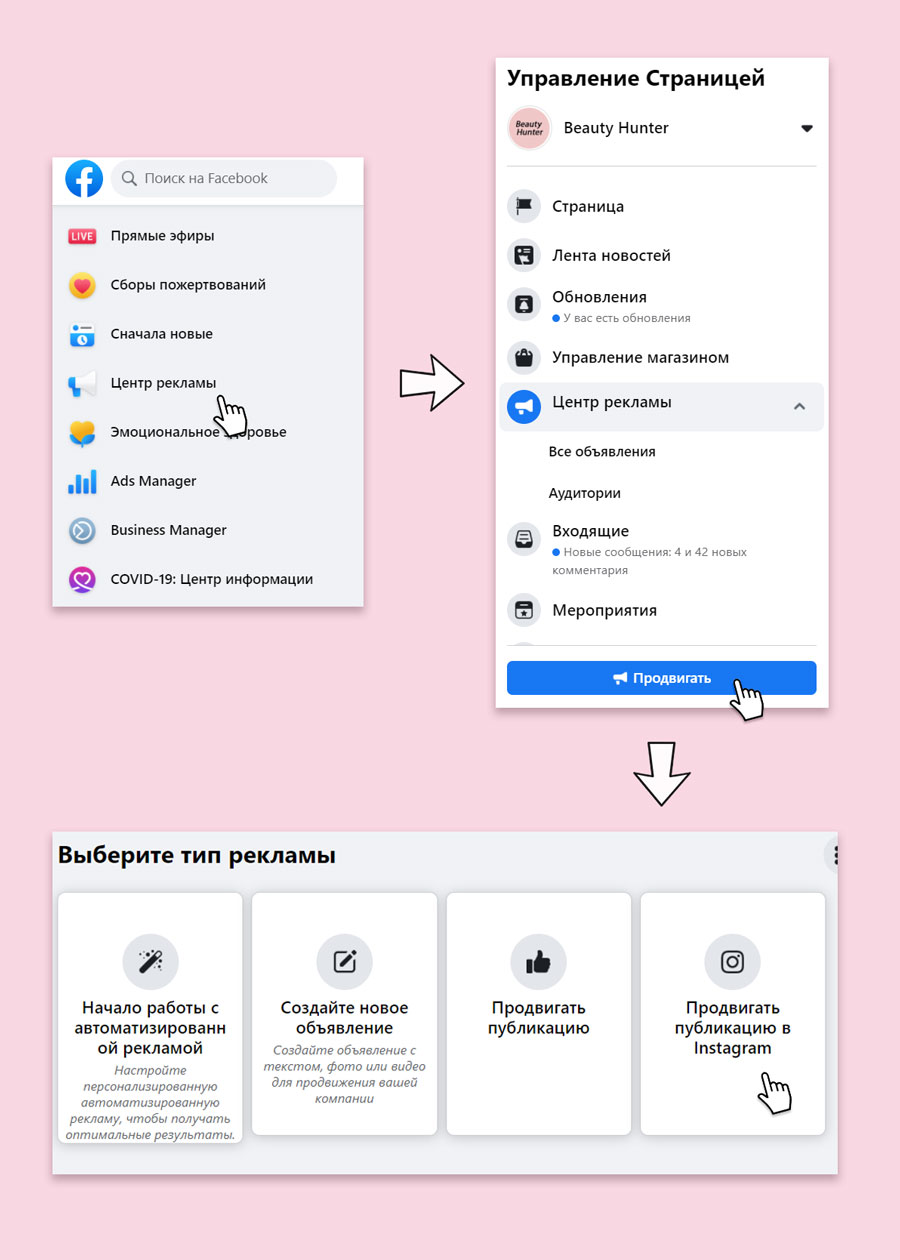
- Fill in campaign-level settings.
Campaign name, daily budget or lifetime budget, bid strategy, and ad schedule. - Fill in ad set-level settings.
Ad set name, where you want to drive traffic, set up the audience for display, and choose ad placements. - Create the ad.
Facebook offers an advanced tool for ad creation and creative work: you can run an existing post as an ad, create a carousel, upload a finished video, or manually create a new dynamic slideshow, as well as customize the display for news feeds and story formats. - Click "Publish" and wait for the ad to pass moderation.
Tips for Beauty Masters on Launching Instagram Ads
And of course, Beauty Hunter can't help but leave you with some tips and life hacks for launching ads. All of them have been repeatedly tested by our personal experience and are guaranteed to work!
- Take full responsibility for your account design. It is the overall impression of your page that makes a user decide to follow and book with you.
- If a creative is GOOD, it will work even without perfectly tuned targeting: geolocation, broad settings by gender, age, and one popular interest are often enough.
- Give Instagram time. Launch the ad and let it work without changes; the longer it runs, the better it optimizes. The platform itself sees who responds best and eventually shows your ad only to relevant users.
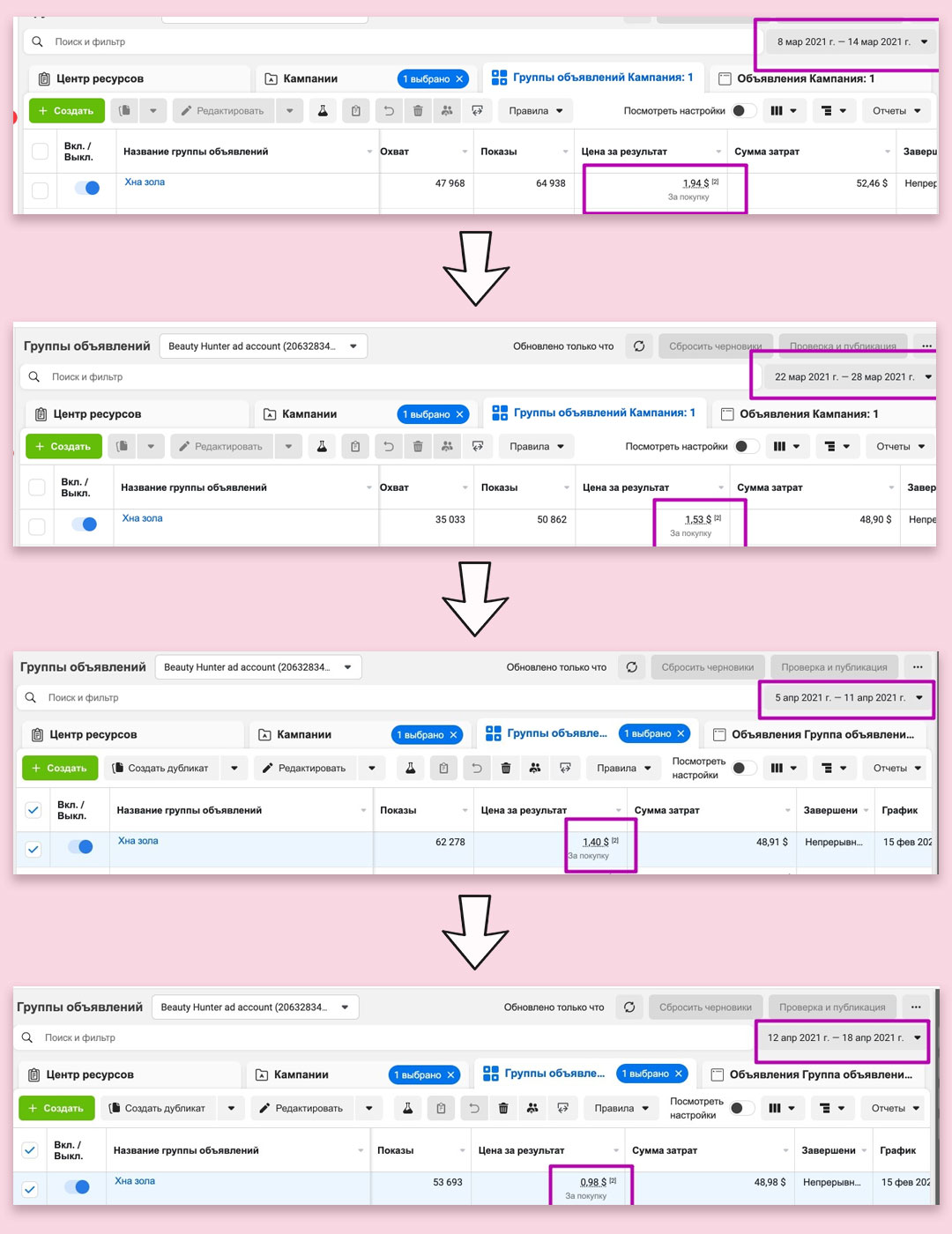
- The narrower the targeting, the more expensive the click. Don't play with narrow interest settings if you're not sure.
- Prepare different creative formats for posts and stories.
- Monitor organic post statistics; if a post performed well with your followers, it will perform well as an ad.
If you've read this far, you already know how to set up ads on Instagram. Now for a bit of practice – you will definitely succeed!
❤️Beauty Hunter with LOVE